Hantek
 
 
SweMOD Updates
We're working on an updated version of SweMOD and we need your response! Send your ideas, click here!

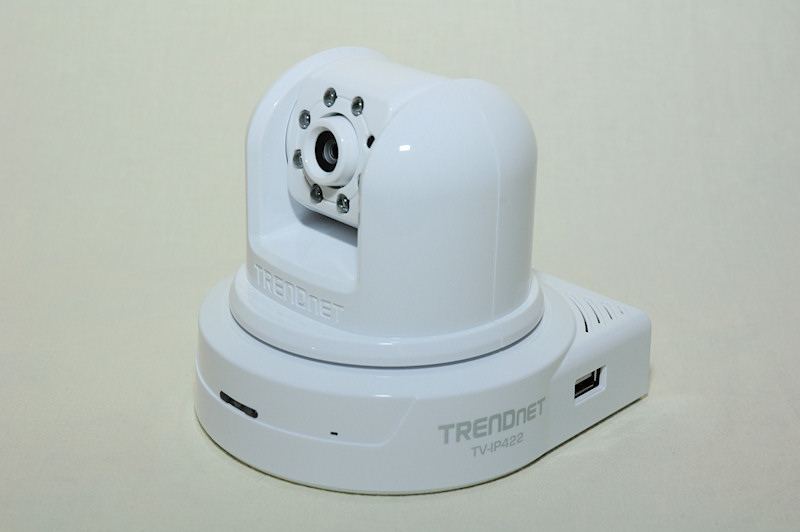
TrendNet TV-IP422

Posted


Category


Author

2009-02-24

Surveillance

Chris Fredriksson

Manufacturer

Supplier


To install the camera on the network make sure to hook up the network cable then the power cable and last either access your routers webpage, if you have one, to find out the IP address or use the IP Setup tool on the CD.



The IP422 takes a maximum of 30 seconds to boot, but normally less than that. At start it also turns maximum left, then 165 degrees right to make sure that the camera is perfectly centred at start.

When you’ve find out the IP address open up your browser and surf to the address. Straight away when entering the page you must install the ActiveX file to be able to see the image from the IP422.

After that is done you will be able to see the image that the camera transmits.


First time I hooked up the camera it was evening outside, so all dark and just a few lamps that was switched on in the room. So immediately the IR leds got turned on to make sure the camera has something to show.

As you can see I’ve placed the camera in front of one of my monitors with two spindles of DVD discs, a Mickey Mouse Christmas figure in the middle, on the left I have a controller for the Logitech sound system and closest in the image we find my Logitech keyboard.

You can see in the image that the keyboard is very bright, this is because of the IR leds that are just an inch or two away.

A bit blurry, but the focus has not been set at this point.

On the left in the web interface we find some controllers, first off is the Live View and Setup buttons. Live View is what you see right now and the Setup button takes you to the settings part of the interface.

Below that we have the compression buttons, MPEG4 and MJPEG. Both these can be tuned in the Setup to make sure you get the best out of both depending on need.

Under that we have the move buttons; up, right, down and left. In the middle is the home button that takes the camera to the factory default home.

Before we continue I would like to add a note that you can control the camera with clicking in the picture as well, it will then move to center the position where you clicked. Great feature to quickly move the camera to an interesting spot!

If we continue down we find the Auto Patrol and Stop buttons. The Auto Patrol takes the camera through 8 different points setup just below with the drop down menu and the apply button.

You can also set a name for each location so that it is easier to find a location later on.

The Stop button stops the camera from whatever it does directly.

Below that is the last set of buttons. They are pretty self explanatory, manual record when you want to record something directly when you see it and snapshot to take a screenshot of the stream.

Talk and Listen is for when you have a speaker installed and the microphone activated on the camera side.

Trigger out is for the GPIO that I talked about earlier, to open the door lock perhaps?

The Setup part is not endless but a bit too big to include into the review, I will go through the most important parts however.

If you’re lazy or just don’t know enough about security cameras and just want the camera up and running, you can go through the Smart Wizard.

For the rest who wants more out of the camera there are several features to explore. In the basic part of the setup you can set a name and location to more easily navigate through several cameras later on when you install the SecurView software.

Here you can also turn off the leds on the front if you want your camera to be a little more secret, not showing people that walk past it if its actually recording them or not.

You can set the date and time which is invaluable when you have recorded a burglar breaking into your property. You can also setup the camera to update its time against and NTP time server, just search for NTP server and your city name on Google and you’ll find a fast and accurate server free to use.

You can also change the password of the admin account, add user accounts that can move the camera but not much more and lastly setup a guest account that only can view the stream.

On the network tab you can setup the IP address, dynamic DNS service, UPNP and the ports for the camera. You can also setup an IP filter to allow or deny people from entering the camera.

Pan / Tilt gives you options to change the speed of the camera, for each click on the main interface on the up, right, down, left buttons you can set up the camera to move between 1 and 20 degrees at once.

You can also initiate the calibration that the camera goes through at the start and also set the time for how long the camera stays in each position on Auto Patrol.

On Video / Audio you can change the compression, flip/mirror the image, set the image size and much more. Here you can also enable/disable the microphone and change the volume of the outgoing sound.

You can also activate the 3GPP Realtime streaming server. This can be used to see the stream from the camera on your mobile phone. Useful if you’re not on the site when something happens and you want to have a look.

Next part is the Event Server and this is where you can save images and videos to. The different choices here are FTP, Email and Network Storage.

Both for FTP and Email you only get images taken during an event. However with the Network Storage option you can get recorded videos.


The Network Interface has to be a samba server however, which is available on Linux systems. Samba is a Windows friendly protocol to which you can connect a “network drive” from network places in Windows XP and forward on.

The IP422 does the same, but connects to the Samba Network Interface drive through Linux.


One fun thing to use with the Event server part is the motion detection in next tab. Here you can configure two separate “windows” in which the camera can detect motion. You can also set the threshold for activity so that it only activates on interesting events.

You can move these windows around and somehow you should be able to resize them, but I was not able to do so. I hope that TrendNet can update this review with information on how to resize the motion detection windows.

Further down the menu we find the Event Config. Here you can change things like the recording interval when something happens, like when motion is detected. Then it can record for example 20 seconds after that.

This counter starts to count down when motion is no longer detected.

You can also set the camera to record at certain times of the day, perhaps you would only like to record during the night when no-one is around.

During motion detection you can also set a few different options, what you would like the camera to do. You can “Trigger out” on the GPIO, enabling a lamp perhaps? “Save image to USB”, “Record to Network Storage”, “Send Email” or “FTP Upload”.

You can also set a schedule trigger to only send emails during the day when someone is around to read the emails and when you go home for the day, it goes over to recording to the Network Storage.

The possibilities are endless with the interface of IP422.

On the Tools tab you can reset to factory default, restart the camera, backup and restore the configuration and also update the firmware.

Second last tab is the USB one, where you can see the total amount of space available and the current space available. You can also set to delete older folders when the space fills up.


Last tab is the Information tab, here you can find information about the name, location, compression and network information.

All in all, the interface for IP422 is awesome with lots of features and possibilities.

On next page we’ll take a look at the quality of some pictures and videos.

<- Previous page Next page ->


"Favourite" tools for: TrendNet TV-IP422


User Comments, for review: TrendNet TV-IP422
No comments posted, be the first to write a comment!


Write a comment
You must be registered and logged in to post comments.
Login | Register


Affiliate news
Gigabyte X79-UD3

> OCIA.net

Gigabyte X79-UD3
Today we will be looking at an X79 motherboard from Gigabyte, the GA-X79-UD3. The UD3 represents Gigabyte's entry level model on the X79 platform but if processor price didn't already tip you off, LGA 2011 is an all-around expensive platform. For example, pricing on this entry-level board starts around $250 - more along the lines of what you'd expect to pay for a premium P67 board.
Cooler Master Silent Pro M2 1000 W

> techPowerUp

Cooler Master Silent Pro M2 1000 W
Recently Cooler Master decided to update their Silent Pro M series and what better name to choose than Silent Pro M2! The new series includes six new semi-modular PSUs with capacities ranging from 420W to 1000W. All are made by CM's favorite OEM, Enhance electronics, feature a single +12V rail and come with a five year warranty. Today we will evaluate the strongest of the M2s with 1 kW capacity.
OCZ Technology Shutters Hypersonic-PC

> Techgage

OCZ Technology Shutters Hypersonic-PC
Over the past few months, it's become increasingly clear that OCZ has shifted its focus more towards its core products, and as a result, the company will no longer invest in things like cooling products, peripherals and so forth. Rather, it will focus on SSDs, memory and of course, power supplies. As I made my earlier post, I had wondered what OCZ's renewed focus would mean for Hypersonic-PC, and that was made clear to me earlier today.
OCZ Vertex Turbo 120GB SSD

> Techgage

OCZ Vertex Turbo 120GB SSD
Making the decision to upgrade to an SSD isn't difficult, but finding the "perfect" SSD is a different story thanks to the sheer amount of choice out there; sometimes even from the same vendor! Fortunately, OCZ's Vertex Turbo delivers a great blend of performance and GB per dollar, making it well worth consideration.
HIS Radeon HD 5670

> Tweaknews

HIS Radeon HD 5670
The HIS Radeon HD5670 is a very capable card for the cheap price of only US$89 at your favorite online retailer. Although it is not a screamer, at almost half the price of a HD5750, for the moderate gamer, it could be considered quite a deal for a videocard sporting such an impressive stock cooling solution.
4-Way Intel H55 Motherboard Shootout

> TechSpot

4-Way Intel H55 Motherboard Shootout
Right now there are a number of quality options for budget-conscious users looking to build a new computer. The AMD Phenom II X2 processor series, for example, will get you a fine deal of processing power at just $110 for the 3.2GHz flagship part. Combine this with the affordable AMD 785G based motherboards selling for around $70 and you have the makings of a seriously good value platform. However, if you are willing to part with a little more cash, then the new Intel Core i3 series might be the way to go. When compared to the dual-core Phenom II X2 555, consumers will pay about $20-$30 more for a Core i3 530 processor, while compatible Intel H55 motherboards are on average $20-$30 more than the AMD alternative as well. There are a number of H55 motherboards available at reasonable prices, so picking one for your next build is no easy task. Our round-up comprises 4 Intel H55 based motherboards from the likes of Asrock, Asus, ECS, and Gigabyte. With a narrow price range between $90 and $105, it all comes down to features and performance.
CiragoTV Pro CTP1000 Multimedia Player

> TestFreaks

CiragoTV Pro CTP1000 Multimedia Player
I’ve taken a look at a few media players here on TestFreaks and most are fairly decent and honestly they’re all pretty similar at least in the interfaces. Today for review I’ve got another one from Cirago called the CiragoTV Pro CTP1000. It’s a media player with HDMI, Component and Composite outputs so you can use it with any TV and it includes a 500gig hard drive for you storage. The CTP1000 also has a memory card reader and a USB port so you can read directly from memory cards, USB flash drives or USB hard drives so you can expand the storage or quickly view things without transferring them to the main hard drive. One thing about this product though is that it’s UBS only for transfers, there’s no networking with this unit, is that a good thing or a bad thing? Read on..
Able Planet True Fidelity NC300B

> Tweaknews

Able Planet True Fidelity NC300B
Able Planet as a company has really piqued my interest, too. They are committed to providing headphones for people with all levels of hearing. The Linx Audio technology aids in this by enhancing high frequency sounds where clarity is often lost in the early stages of hearing loss.
Customize Your Windows 7 Start Menu Bu

> TechSpot

Customize Your Windows 7 Start Menu Button
Windows users have been customizing their desktops in a variety of ways for years. Whether by downloading themes and backgrounds, or using third party applications to change more obscure settings like the default logon screen, many people seem intent on personalizing every aspect of their operating system to something that fits their individual taste. And what better to alter than an icon that's always visible? While we don't mind the Windows 7 Start Menu icon, and actually feel it's somewhat of a leap from the rectangular buttons of old, swapping out the orb for a new icon is quick and painless with the help of Kishan-Bagaria's Windows 7 Start Orb Changer. It even comes with a few examples to get you started.
Patriot Gamer-Series DDR3-1600 Memory

> Benchmark Reviews

Patriot Gamer-Series DDR3-1600 Memory Kit
Overclocking is getting easier than ever, and more and more users are finding that they want to try their hand at what used to be an art reserved for hardcore computer enthusiasts. In this article Benchmark Reviews tests the Patriot Gamer Series 4GB PC3-12800 DDR3-1600 dual-channel system memory kit, SKU PGS34G1600ELKA. Patriot designed this DDR3 kit to work with BEMPs (Black Edition Memory Profiles) that have been uploaded for use with the AMD Overdrive program in order to make overclocking even easier for the average enthusiast. This Patriot Gamer Series DDR3 RAM is designed to work in tandem with AMD Black Edition processors, but can be overclocked quite effectively in nearly any DDR3 compatible system. Priced at $130, the Patriot Gamer Series PC3-12800 DDR3-1600 kit represents a great opportunity for PC hardware enthusiasts to upgrade to low latency, high-performance memory at a very affordable price.
Partners

Hantek, http://www.hantek.com/english/product.asp

Powered by

CityNetwork, http://www.citynetwork.se

CityCloud, http://www.citycloud.se/


Partners

Akasa, http://www.akasa.com.tw
AMD, http://www.amd.com
Antec, http://www.antec.com
BatchPCB, http://www.batchpcb.com
Boogie Bug, http://www.boogiebug.com
Caseking, http://www.caseking.de
CityCloud, http://www.citycloud.se
CityNetwork, http://www.citynetwork.se
Cooler Master, http://www.coolermaster-europe.com/
Coolstuff, http://www.coolstuff.se
Corsair, http://www.corsair.com
Futuremark, http://www.futuremark.com
Gigabyte, http://www.gigabyte.com
Ikonik, http://www.ikonik.com
Intel, http://www.intel.com
Jetway, http://www.jetway.com.tw
Microsoft, http://www.microsoft.com
MikroElektronika, http://www.mikroe.com/en/
Mionix, http://www.mionix.net
Noctua, http://www.noctua.at
SanDisk, http://www.sandisk.com
SteelSeries, http://www.steelseries.com
Swiftech, http://www.swiftnets.com
Titan, http://www.titan-cd.com
TRENDnet, http://www.trendnet.com
Trion Worlds, http://www.trionworlds.com/en/
Twinmos, http://www.twinmos.com
Vizo, http://www.vizo.com.tw
Xigmatek, http://www.xigmatek.com
Zalman, http://www.zalman.co.kr/eng/main.asp
Zen Toolworks, http://www.zentoolworks.com
ZeroTherm, http://www.zerotherm.net
ZOWIE Gear, http://www.zowiegear.com
View review list -
Affiliates